Real Estate Window Displays: See Your Agency’s Window Before You Decide
Whether you run an agency or a shop, your window is working for you all day. Before you choose any real estate window displays or retail screens, it helps to see them in your own window, not in a brochure. At VitrineMedia Australia we do that with Vision Insitu, our mockup tool. We drop the displays onto a photo of your frontage, at real size, and send you a link to look at. These are the questions it answers. VisionInsitu can accommodate Cable Displays, digital displays, video walls, billboards
Will it fit my window?
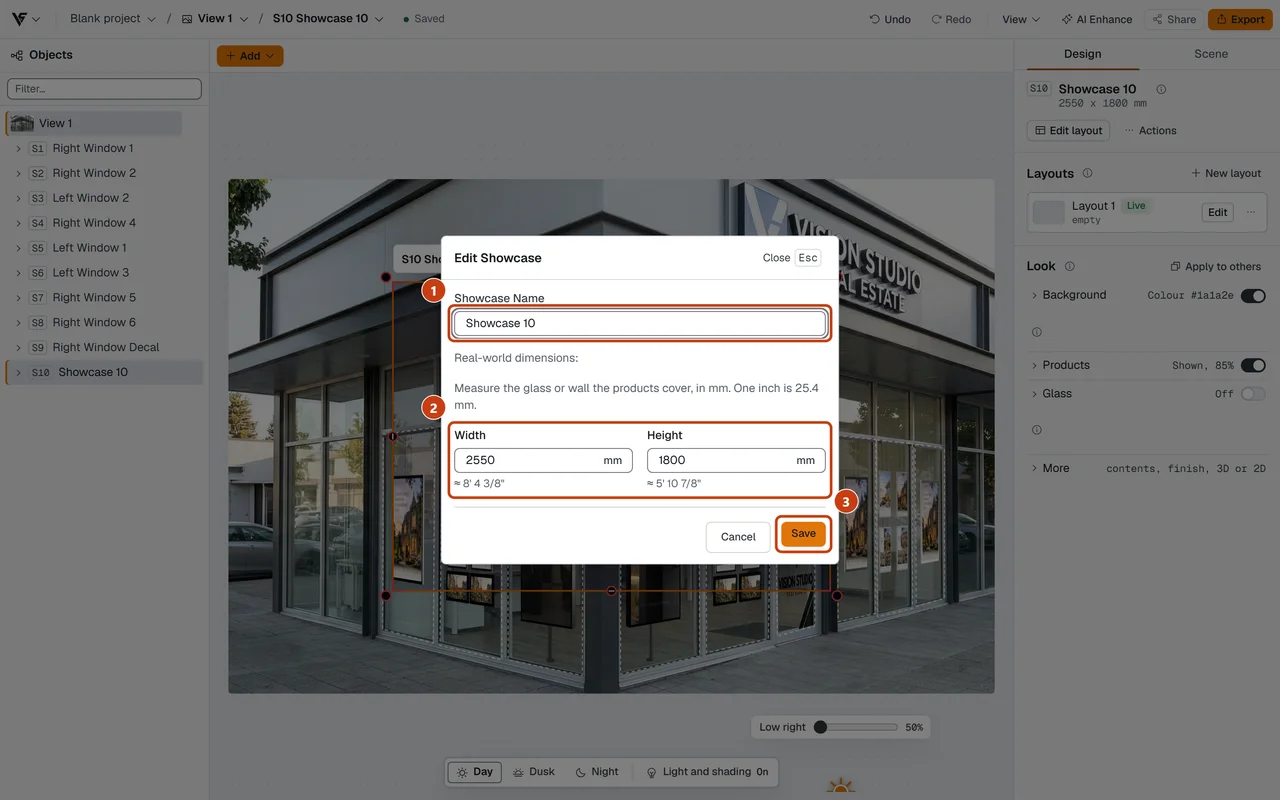
Everything begins with two things: a photo of your frontage and the true width and height of the glass we are designing for. Displays go in at their actual product sizes, so the picture shows what would genuinely fit, not what would be nice if it did.
Where we enter your glass size, in millimetres, so the design is to scale.
For cable-hung window displays, the rails and top cables are cut to any length, so the design can follow the real span of your window instead of a standard size. We also run the checks that flag displays that do not suit a cable setup, so problems come up on screen rather than on install day.
What will it look like in our window?
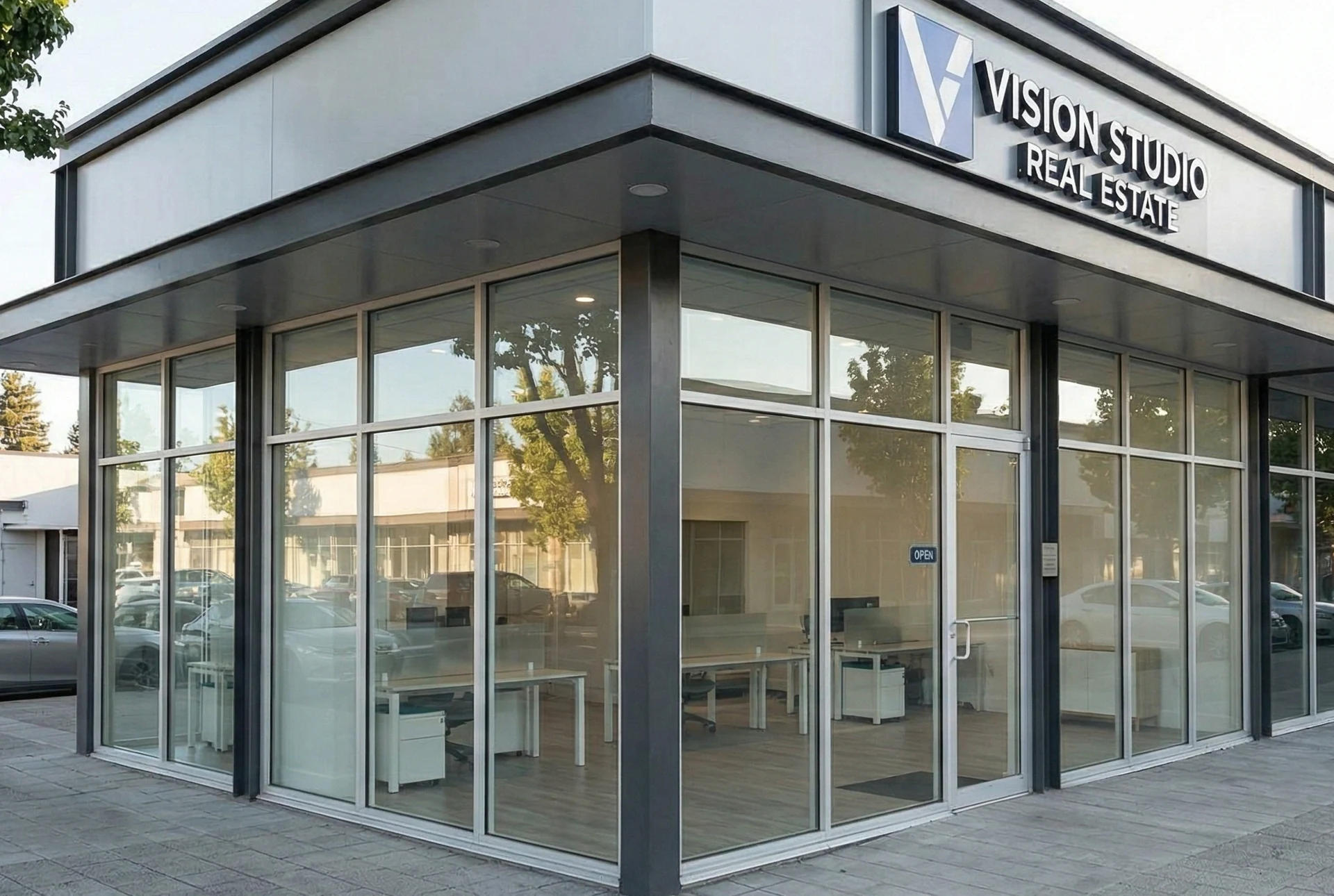
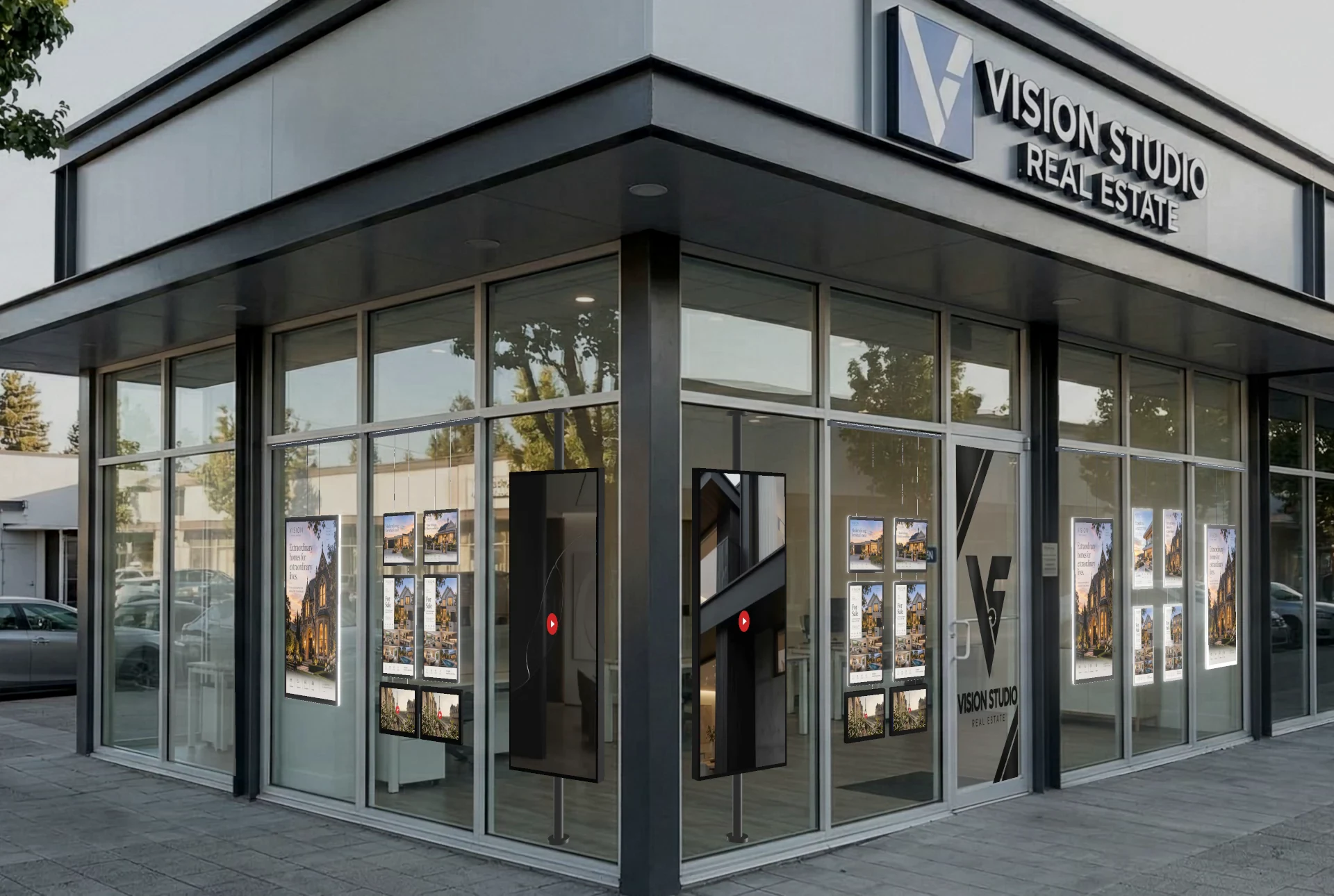
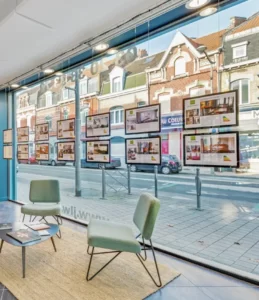
Here is an example agency frontage before and after. Seeing your own window like this is what we mean by signage mockups: a realistic preview, built on your photo, so you are choosing from what you can see.
Before: the example agency frontage, straight from the camera.After: the same frontage with cable-hung displays and screens on poles (example project).
The same approach works for shop window displays. Window display mockups let you check how the glass reads from the footpath, how much of the view into the shop you keep and how a light box or a hanging display sits next to your signage.
Will it still look like my shop?
Good window display design has two jobs: show what you offer and still feel like your business. The mockup lets you check both. You can see how much of the view into the premises you keep, how the displays line up with your sign above, and how they sit with the door and the glass around them. If you would like your logo on the glass, a decal can be added to the design, so you see it in place rather than imagining it.
What are my options?
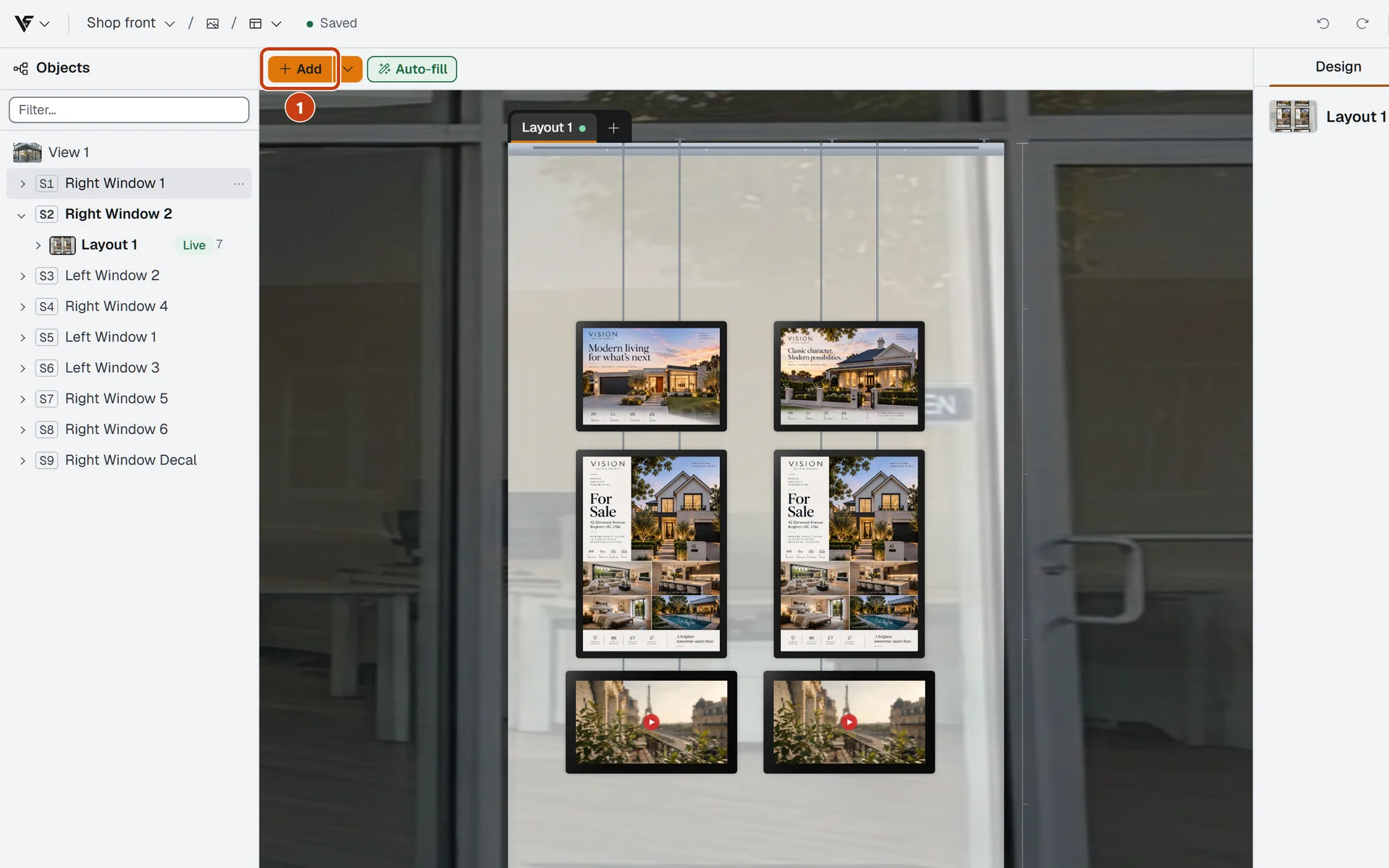
We can build more than one layout on the same photo. You might look at an all-cable-hung arrangement, a mix that includes a light box, and a simpler version with fewer displays. They all sit in the link we send, so you can compare them in your own time.
One window, laid out with cable-hung displays (example project).
Our aim is the right fit for your window. If a simpler layout does the job, the comparison will show it, and that is a perfectly good outcome.
And in the evening?
Your window is on show after the shop has closed, too. Flip the design to dusk or night and you can judge how lit displays and light boxes look once the street light changes. It is a good moment to notice whether a layout still feels balanced when the displays are the brightest thing on the frontage.
What if I want a change?
Say what you would like different and we adjust the design on our side. There is no queue waiting on a designer, and the link you already have shows the updated version. No waiting days for a revised file, and no meeting needed to look at it.
Who else needs to agree?
Often more than one person has a say: a business partner, a franchisor or head office, a landlord. The Share link we send opens on a phone or a computer, without any sign-up or software to download. Forward it to whoever needs to see it, and everyone approves the same design.
Two optional settings help here: a password on the link, and an expiry date after which it stops working. The link works for whoever receives it, so a password is worth having on anything sensitive. Once you have signed off, we can turn it off.
Will there be surprises at install?
Because the design is drawn from actual measurements and actual product sizes, what you approve lines up with what gets quoted and made. That usually helps you land on the right sizes and quantities first go, with fewer late changes and fewer extra meetings or visits. A mockup is still a visualisation, so we check the dimensions on site before production starts.
From your window to your approval
We take a photo of your shopfront and measure the glass.
We mark the window on the photo and place the displays to scale.
We prepare one or more layouts and check them against the original photo.
You receive the Share link to open, compare and forward.
You ask for any changes, and we update the same link.
It is a short path with no hand-off to a design queue, which is why you can get answers faster. If you also want pictures to keep, we can export the design as images or a short video.
Frequently asked questions
What is a window display mockup?
It is a realistic picture of displays placed on a photo of your own window, at real size, so you can see the result before anything is made or installed.
How do you know the displays will fit my window?
We measure the glass and enter its real width and height. Displays are placed using their real product sizes, so the design is to scale, and we check the dimensions on site before production starts.
Can my landlord or head office see the design?
Yes. The Share link opens on a phone or computer with no account needed, so you can pass it on to them directly. Optional extras are a password and an end date, and the link can be turned off when the job is closed.
Can I compare different layouts?
Yes. The same window can carry several layouts, for example all cable-hung displays, a light box or a mix, and the link lets you flip between them.
What if I want to change something after I have seen it?
Let us know what you would like different. We adjust the design, and the link you already have shows the updated version.
Imagine a product that would have left Victor Kiam green with envy– imagine the Vitrinemedia Eco-Smart Display! I clearly remember back in the late 1970s when, in my late teens and wearing a much younger man’s clothes, I fell upon an advertisement on television featuring a chap named Victor Kiam. He had just bought his first Remington electric shaver and, inspired by the close and clean shave it delivered, he made another altogether larger purchase…the company. I can still hear his American accent in my ears, telling…
VITRINEMEDIA CASE STUDYHEDLAND PROPERTY SHOP15 DECEMBER 2023 __________________________________________________________________________________ Vitrinemedia’s excellent customer service outshines ‘tyranny of distance’ for Hedland Property Shop It’s common knowledge that one of Vitrinemedia’s greatest points of difference over competitors is a physical presence in each mainland state, backed by a commitment to come out in person to meet the potential client, view the location, discuss possible solutions and make educated recommendations. And even on those odd occasions where a physical visit is not possible and would be a hefty financial burden on the…
Poor paper with VM screens akin to uggies and a Savile Row suitSartorial splendour.Two words that evoke so much, presenting a picture we all instantly recognise when it enters ourlives, even if fleetingly.We might not all be able to achieve it, but we know it’s a compelling nod to style and sophistication,its eye-catching powers leaving us envious of the ability of others to pull it all together – and pull itoff.There’s no arguing that sartorial splendour is an art, the result of all elements working in perfectharmony…
There’s no such thing as bad weather, only inappropriate clothing Skyrocketing energy prices, interest rates on the rise, cost of living pressures mounting as the humble lettuce nudges $10 a pop… That’s the news of the day, the inflation narrative that hoggs the headlines as we move through the winter of 2022, challenged only by Covid-19’s obligatory daily updates. At times like this, with media reports telling us that we should learn to live with petrol prices that are sure to jump again when the Federal Government’s…















Comments are closed